 LiveCast
Twitch polls with a QR code
Create Twitch polls here and give viewers two ways to join: scan the QR code on stream or tap the voting link in chat. Copy the results URL into OBS to show the count as it changes.
By LiveCastPoll ·
Twitch poll commands vs QR voting
The native Twitch poll command is /poll. A broadcaster, moderator, or editor can use it on an eligible channel to open the poll manager. Once a poll is running, a viewer can type /vote 2 to choose the second answer. That’s handy during a game when chat is open and the keyboard is already within reach. Twitch’s command instructions.
A chat bot can use different instructions. If yours expects !1 for Harbor or !2 for Summit, post both choices in that order. In chat.vote’s number mode the viewer sends a plain number. Pick the tool before you announce the syntax so the first wave of votes lands in the right count. See the chat poll guide with copyable mod messages.
For a QR vote, use the poll builder above and put the overlay in your scene. You can create the ballot without a Twitch connection, bot, or moderator privileges. Someone watching on TV can scan with a phone. Someone watching on their phone can tap the viewer link in chat. A moderator who normally posts links can share it if your channel restricts links.
Use a chat command for regulars making a quick decision together. Use the web ballot for a guest stream when Twitch, Kick, and viewers with chat closed all get a say in the same result.
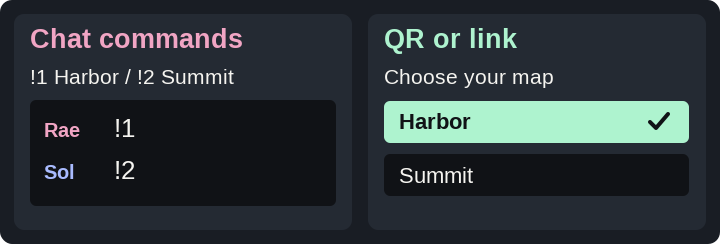
Twitch voting across a live audience
At character select, ask “Which class gets one attempt?” Use the class names from the game. Read them aloud, then show the leading choice before you lock it in. Give your mod the voting URL before the segment and put the results URL into your OBS browser source.
For Twitch polls that let regulars spend Channel Points on extra votes, use the native panel. For one ballot across a multistream, share the same LiveCastPoll link in each chat. Compare all three ways to poll on Twitch or compare the platforms’ native polls.
Twitch polls FAQ
What is the Twitch poll command?
Type /poll in an eligible channel’s chat to open the native poll manager as the broadcaster, a moderator, or an editor. To vote in an active native poll, type /vote 1 for the first choice or /vote 2 for the second.
Can I run a Twitch poll without a bot?
Yes. Create a QR poll in the builder and share its viewer link in chat. Viewers can open it in a browser without connecting a Twitch account.