 LiveCast
How to make a poll in Twitch chat
Here’s how to make a poll in Twitch chat: connect a chat voting tool and ask viewers to type their choice, or create a web poll and paste its voting link into chat. The first counts messages. The second lets anyone tap a ballot, including phone viewers who already have the stream open.
By LiveCastPoll ·
Chat command voting — how it works
Say your team has one match left and two maps to choose from. Open chat.vote, connect your Twitch channel, enter Harbor and Summit in that order, and select its numbered voting mode. Start voting before you post the instruction. A “2” sent while you’re still setting up is just a chat message.
Mod message
Last map of the night! Type 1 for Harbor or 2 for Summit. We’ll take the lead when the lobby opens.
In that setup, a viewer types 2 and sends it as a message. The tool reads the message and adds a vote to Summit. chat.vote also lets you use option names. That works well for short names like Harbor. Use numbers when two maps have similar names or one has punctuation that’s awkward on a phone keyboard.
If your channel bot is configured for !1 and !2, include the exclamation marks in your mod message. Copy the syntax from the tool showing the count. Twitch’s built-in /poll opens its native poll manager, and /vote 2 selects the second answer in an active native poll. For that setup, see how to make a poll on Twitch using the native panel.
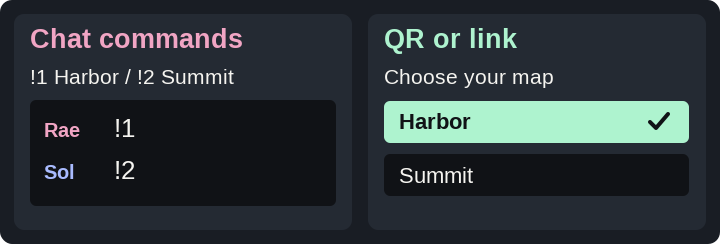
Messages coming in but the count stays at zero? Check the channel name, whether voting is open, and which input mode the tool expects. Have one moderator send the advertised choice while you watch the count. If that works, repeat the corrected instruction once. Keep the same option order for the whole round.
Voting by link or QR in chat
Open the Twitch poll maker, write the question, and create the poll. You’ll see two URLs. Copy Viewer voting link for chat. The OBS browser source URL opens a results display. If someone opens your link and sees bars but no buttons before they’ve voted, check which URL you posted.
Mod message
Which map should we queue? Tap the ballot and pick Harbor or Summit: [paste viewer voting link here]. If you’re watching on TV, scan the code on stream.
On a phone, the viewer taps the link, taps an answer, and can return to the broadcast. On a TV, a viewer points their phone camera at the code and opens the same ballot. Keep the QR still while you read the choices. Give chat the link again when you switch scenes if the original message has scrolled away.
For a co-stream, hand your guest the same viewer link before the segment. Have each host post it in their own chat. Both groups now contribute to one count, and either host can display the result. The Kick poll maker instructions cover sharing that same vote with a Kick audience. A group that simply needs a shareable web ballot can also use StrawPoll.
Chat voting vs link voting
| During the stream | Chat-message vote | LiveCastPoll link or QR |
|---|---|---|
| Viewer action | Send the requested number, word, or configured command. | Open the ballot and tap the answer by name. |
| Who can join? | People who can send messages in the connected channel. | Anyone who can open the ballot in a browser. |
| What the host watches | The count in the tool reading chat. | The results overlay in the broadcast scene. |
| Good moment to use it | A fast rematch decision among regular chatters. | A map vote shared with TV viewers or a second channel. |
How to make a poll in Twitch chat easy to follow
Give the audience one instruction at a time. If you’re collecting messages, say “type your map number.” If you’re collecting link votes, say “tap your map on the ballot.” A viewer who types “Harbor” into chat during a web poll might reasonably think they’ve voted. Your mod can reply with the ballot while the round is still open.
Frequently asked questions
Can people vote by typing !1 or !2?
Yes, if the channel’s voting tool is configured for those commands. In chat.vote’s number mode, send just 1 or 2. For Twitch’s native poll, use /vote followed by the option number.
Can I post the ballot without adding a bot?
Yes. Copy the viewer voting link and have someone allowed to post links share it in chat. LiveCastPoll counts answers submitted on the ballot.
Which link should my moderator pin or repost?
Use the viewer voting link containing /p/. Open it before posting and look for the question and answer buttons. The URL containing /overlay/ is for showing results in your scene.
Can someone with chat closed still vote?
Yes, if the QR code is visible on the broadcast. A viewer watching on a second screen can scan it with a phone. Give viewers watching on one phone a tappable link too.