 LiveCast
How to make a poll on Twitch
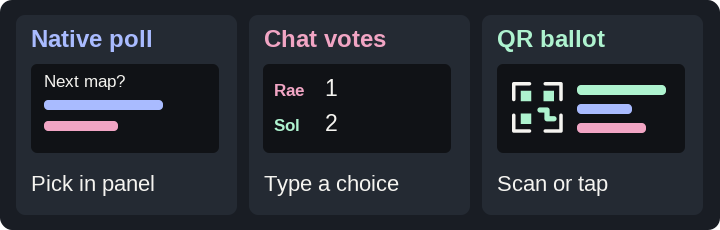
Here’s how to do a poll on Twitch: type /poll for a built-in vote at the top of chat, connect a chat voting tool when viewers want to type their choice, or share a QR ballot when people watch on phones, TVs, or several platforms. Pick one place to count votes.
By LiveCastPoll ·
How to do a poll on Twitch between rounds
At map select, ask “Where should we land?” and offer Harbor or Summit. If you can already see both options in the game, read their names aloud anyway. Someone listening while the lobby loads can still make a choice. Decide when you’ll call the winner before the queue pops.
Method 1: Twitch's built-in poll
In your channel chat, enter /poll and press Enter. This opens the poll manager. Choose New Poll, enter your question, add two to five answers, set a duration, and start the poll. In Creator Dashboard you can also open Stream Manager and use the Manage Poll quick action. Add it to your quick actions if it’s missing.
Twitch Help describes native polls as a feature for monetized streamers. If you’re an Affiliate or Partner, look for Manage Poll in your dashboard. On a newer channel, check whether you’ve completed monetization onboarding and whether the action is available. You can use either of the next two methods if it isn’t. Twitch’s poll instructions and duration limits.
A viewer can expand the poll at the top of chat, choose Harbor, and press Vote. Someone with a keyboard can enter /vote 1 for the first choice. The first vote is free. Leave extra Channel Points votes switched off for a straight headcount. Enable them when spending points is part of the round, and tell chat what one extra vote costs.
| Built-in advantage | Trade-off on air |
|---|---|
| Your mod can launch the next question while you play. | The poll belongs to that Twitch channel. |
| Channel regulars can spend points if you enable extra votes. | A winning percentage can reflect several votes from one viewer. |
Method 2: Chat command polls
Connect a chat voting tool to your channel, enter the answers in order, and start accepting votes. Put the exact voting instruction beside the question. In chat.vote, number mode accepts 1 or 2. Its option-name mode lets viewers type the name instead. A bot configured to recognize !1 and !2 needs those exact messages.
This works particularly well between speedrun attempts. Your hands are on the controller, your regulars have chat open, and your mod can post “1 for Harbor, 2 for Summit.” Nobody needs to pick up a phone. Viewers do need a Twitch account that can speak in your chat. Someone watching with chat closed will need another way to see the question.
Before the real round, ask a mod to cast a practice vote. Watch the total in the voting tool to confirm the command registered, then start a fresh poll. For copyable moderator messages and help with missing votes, see how to make a poll in Twitch chat.
Method 3: QR code polls (no commands, no account)
Use one web ballot when the question also matters to someone on a TV, in Discord, or watching a co-stream. The host can create a LiveCastPoll question without connecting Twitch. Viewers can use a camera or open the same ballot from a chat link.
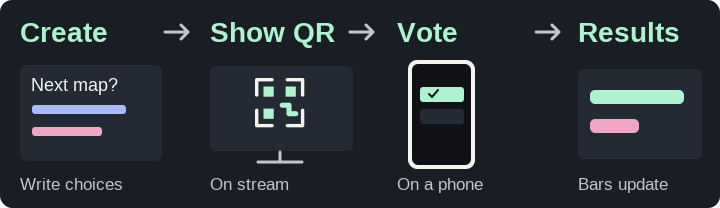
- Create the ballot. In the Twitch poll maker, enter the question and two to six choices. Select Create live poll. Copy the viewer voting link for your moderator.
- Put the QR on screen. Copy the separate OBS browser source URL. In OBS, choose Sources → + → Browser and paste it into the URL field. The overlay shows the QR and results together. Follow the OBS setup guide for scene placement.
- Invite a vote and watch the bars. Ask desktop and TV viewers to scan. Give phone viewers the link in chat so they can vote on the device they’re holding. Leave the overlay on screen long enough for the broadcast delay and a camera scan.
Which Twitch poll method should you use?
Think about the next sixty seconds of the show. A quick equipment choice during a match favors the input your regulars already use. A community vote that opens during the break can give people time to reach for a phone. These setup estimates assume your question and answers are ready.
| Method | Setup time | Host needs | Platforms | Viewer effort |
|---|---|---|---|---|
| Native | About a minute | Poll-enabled channel and rights to start it | Twitch | Tap Vote or enter /vote |
| Chat tool | A few minutes on first connection | A tool reading channel chat | The connected chat | Sign in and send one message |
| QR or link | About a minute for a link; allow extra time for OBS | Browser; a scene for the overlay | Anywhere you share the ballot | Open or scan, then tap |
If the result will decide what happens live, announce the tally when you act on it. A 24-hour web ballot can keep collecting votes after you’ve picked a map. For the next round, change both links together. Need a question with two playable outcomes? Browse 50 stream poll ideas.
Frequently asked questions
Do viewers need an account to vote?
Twitch’s poll and chat-message voting use a Twitch login. A viewer opening a LiveCastPoll ballot can tap an answer without signing in.
Can Twitch moderators create polls?
Yes. A moderator or editor can enter /poll in an eligible channel to open its poll manager. The broadcaster can also start a poll from Stream Manager.
Do Twitch polls work on mobile?
Yes. Viewers can vote in a native poll on mobile. Twitch says additional Channel Points votes are unavailable on mobile. For a QR poll, post the ballot link for viewers watching on their only phone.
How long do Twitch polls last?
Twitch’s native poll duration ranges from 15 seconds to 30 minutes. Chat tools have their own timers. A LiveCastPoll ballot accepts votes for 24 hours from creation.